

Why should every page within your website have a well composed title and description tag?
Anyone who runs a website and wants more visitors should be aware of their importance. This is one of the most effective (and free) techniques you can employ to gain higher listings on search engines and to encourage users to visit your web pages.
In this article we’ll be focusing on the way in which Google indexes web pages (due to it’s overriding popularity). But these guidelines apply equally to most other search engines.
First, some basics about how Google indexes web pages
Google indexes the individual web pages in your website and will present a listing for any particular page within your website in their search engine results pages (the list of results produced after you press ‘search’). Typically, the appearance of a page listing is similar to the screenshot shown below.
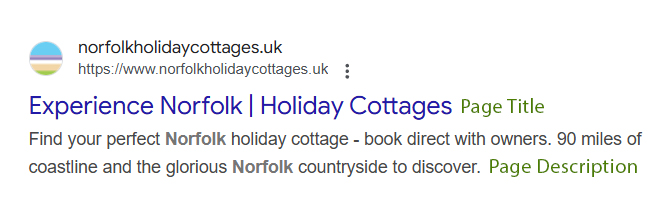
Note that every page in your website is individually indexed. Google is not an index of websites, but rather individual web pages. If you only have one web page in your website, you’ll only ever have one listing. Therefore it’s important to consider each page within your website individually and to ensure the titles and descriptions accurately reflect the content of each page.
Targeting your keywords – it’s not rocket science
By customising the titles and descriptions for each page individually, it is possible to design pages which target specific keywords (which you would like to be found under on search engines). Naturally, these keywords should appear prominently and frequently in your page content too. This is the perfect recipe for favourable search engine listings.
And of course, when a user sees your listing on a results page, if your title and description are carefully composed, your listing will stand out to them from others. It’s essentially no different to the days when we would carefully craft an enticing printed advert.
How do I view web page titles and descriptions?
Anybody with a web browser can view page titles and descriptions. And, yes, you can view this information for any web page, not just your own. Viewing the titles and description tags for pages other than your own can inspire you and help you to understand how others approach things.
- Chrome & Firefox: Right click anywhere on the page and select View Page Source
- Safari: Select Develop > Show Page Source from the top menu bar
Look for the following code:
<title>Your page title</title>
<meta name=”description” content=”Your page description” />
Some simple guidelines
Titles (60 characters maximum, roughly, including spaces)
A brief title explaining the content of the page.
This is shown as the first line of your page listing on Google, is underlined and usually coloured blue or purple. It forms a clickable link for the user to visit your page. Within your web browser, titles are usually displayed in the title bar and as the ‘tab’ title. If a user bookmarks your page (adding it to favourites), the title is often used as the default bookmark/favourite name.
Descriptions (160 characters maximum, roughly, including spaces)
A brief and concise summary of your page’s content. This appears under your title on Google page results.
If you exceed the recommended maximum number of characters, your title or description is likely to be truncated (with … added at the end). If no title or description is set, Google will often use information extracted from the page content. Under these circumstances, the results can be unpredictable (and undesirable).
NB – Google will sometimes ignore your specified description tag. In some cases, Google will instead use an extract from your content with the words the user has searched for highlighted in bold. Nobody has control over this behaviour; it’s just something Google sometimes opts to do.
How do I change my page titles and descriptions?
WordPress powered websites
If your website is powered by WordPress, page titles and descriptions can be easily set using the Yoast plugin. This is done on a page by page basis.
Yoast allows you to set page titles and descriptions when editing pages. It provides you with a colour coded system for optimising lengths and a handy preview of how it might look as a search engine result (on both mobile and desktops).

‘Old style’ HTML hand coded websites
If you have an ‘old style’ hand coded HTML website, titles and descriptions can be set and adjusted using web page editing software.
Contact us (or your own web designer, if you’re not one of our clients) to discuss your proposed changes and update these for you. If you compose your own titles and descriptions for each page, your web designer should be able to update these very quickly and easily for you.
The task of updating the code is simple. The time consuming part is actually composing them so why not do this yourself and just ask your web designer to update them for you?
Make no mistake about it, this is one of the single easiest improvements you make to your web pages to achieve higher search engine listings and entice customers to visit your pages.
Further reading
(as explained by Yoast)